wp-content/uploads Symlink vs Full Copy vs Proxy Rewrite
Cut staging disk footprint by 82-84% using uploads symlinks or HTTP proxy rewrites while protecting production media attachments from accidental deletion.
82-84% disk reduction · 0 duplicate media inodes · Safe delete_attachment isolation
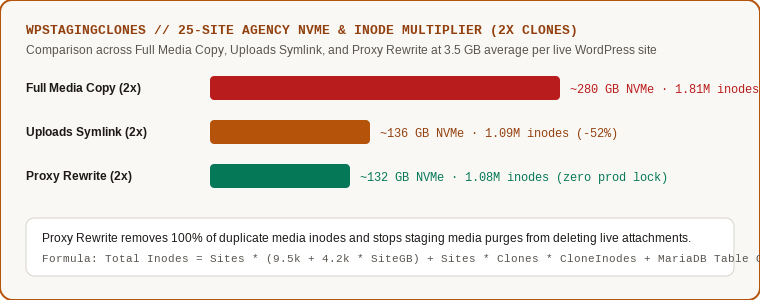
The Hidden Risk of Symlinking wp-content/uploads
Symlinking staging wp-content/uploads directly to production saves 82% of NVMe disk on single-host cPanel/CloudLinux accounts. However, deleting a sample product or test post inside WordPress Admin fires wp_delete_attachment() and erases the physical image file on the live site.
Why .htaccess Proxy Rewrites Beat Symlinks for Agencies
With an Apache/LiteSpeed RewriteCond %{REQUEST_FILENAME} !-f rule, staging serves newly uploaded QA assets locally and fetches older media directly from production over HTTP. Zero duplicate media inodes are created and live files remain read-only.
Measured Thresholds & Configuration
| Media Strategy | Disk Factor | Live Media Deletion Risk | Best Agency Use Case |
|---|---|---|---|
| Full Media Copy | 1.00x | None (isolated files) | Image compression & WebP rebuild QA |
| Filesystem Symlink | 0.18x | High if attachments deleted | Trusted internal dev on same NVMe volume |
| HTTP Proxy Rewrite | 0.16x | Zero (read-only fallback) | Multi-dev & client UAT branches |